
Big black boxes show up on ForNAV reports – old
After a Microsoft Windows Cumulative Update (CU) was rolled out on October 12, 2021, some ForNAV reports render big black boxes on the output instead of borders or lines.
The problem is in Windows, where lines or borders with default width (the value is shown as 1 and non-bold in the property window) or width set to zero, are shown as black boxes instead of thin lines.
Microsoft will likely roll out a new update that fixes the problem.
However, the short-term fix for this is to roll back the Windows CU:
To identify the latest Windows CU, go to Windows Update, Update History. To uninstall it, click Uninstall an Update.
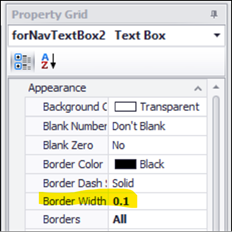
Another workaround is to change the border width on the affected borders or lines to, for example, 0.1.
This version of ForNAV includes a workaround that fixes the problem. Because this requires an upgrade of all ForNAV reports, we do not recommend this as a short-term solution, unless Microsoft for some reason decides not to release a fix to the problem.
Click here to download a preview of version 6.2 (currently 6.1.0.2128)
Latest news
Latest knowledge base articles
-
AI Assistant in the ForNAV Designer (beta)
-
Mapping from Business Central documents to ZUGFeRD and XRechnung
-
Using native Business Central ZUGFeRD generation with FORNAV reports
-
Repeater tables and barcodes in the ForNAV Template Editor
-
Controlling report language, format region, copies, and watermark with the Report Settings page